Phone Tracker – Location Share
- 4.4
- Rating
- 1.00M
- Installs
- Free
- Price
 Analysis by App-foxy
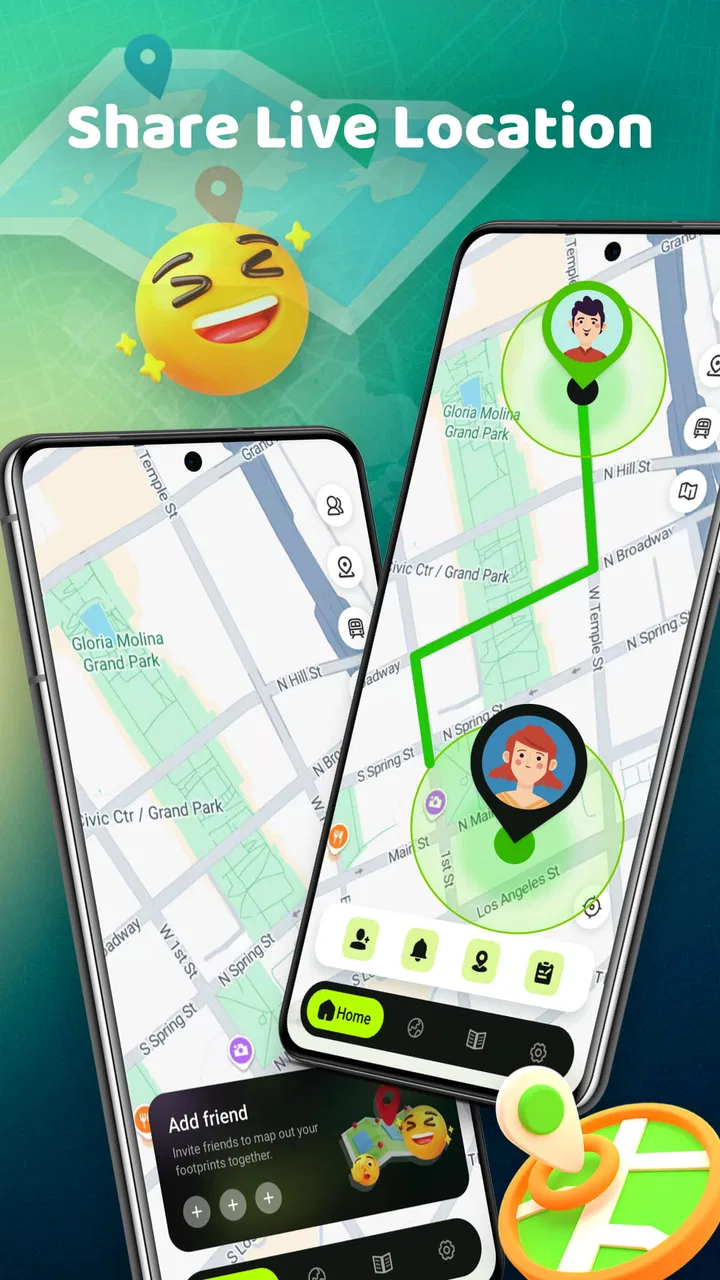
Phone Tracker – Location Share is a free Maps & Navigation app from MARO APPS that focuses on phone tracking and location sharing. I approached it as the sort of tool someone might keep ready for meeting friends, checking where a family member is, or finding a phone-related location without opening a full navigation suite. Its store summary describes it as a number locator and real connection map, while the short description presents it as a phone tracker.
That wording tells me the app is aimed at quick location-related tasks rather than turn-by-turn driving. In my view, that distinction matters. A navigation app helps me get from one place to another; this kind of tracker is more about understanding a connection between a phone number, a device, and a location. The practical value depends heavily on how clearly the app explains what it can show and what the person being located needs to do.
What the free access actually means
The app is free to download, so there is no purchase decision before trying its basic experience. That makes it easy to test without committing money, especially if I only need a lightweight location tool for a short period. The listed content rating is Everyone, which also makes it broadly approachable for general users.
You May Also Like

 Blood Strike: 2.5 Anniversary
Blood Strike’s Loadouts Turn Every Drop Into a Tactical Gamble
A close look at Blood Strike’s custom loadouts: how fast access to signature weapons reshapes its battle royale rhythm, rewards preparation, and narrows the gap between fights.

 Pandora - Music & Podcasts
Pandora’s Music Is Easy to Start, but Harder to Recover
Pandora’s strength is its low-effort path from a seed to a station. Its weak spot is how much confidence it asks you to place in connection, setup, and quiet recovery.

 8 Ball Pool
 Is Built on Rivalries, Rematches, and Routine
A close look at the rivalries, rematches, shared routines, and unanswered safety questions that turn a quick pool match into a persistent mobile community.

 Samsung Music
’s Quiet Strength Is Playing What You Already Own
Its reach comes less from spectacle than from dependable access to a personal library. That simplicity is both the app’s strongest retention engine and its ceiling.

 AccuWeather: Weather Radar
AccuWeather Review: A Quick, Clear Forecast for Everyday Decisions
For everyday plans, the best forecast is the one you can understand quickly. AccuWeather makes rain timing, radar, and local conditions easy to act on, with a few trade-offs.

 Hill Climb Racing
Why Hill Climb Racing Still Turns Crashes Into One More Run
A tiny car, a bumpy hill and one more upgrade: Hill Climb Racing keeps resurfacing because its simple chaos makes every near-miss feel personal.
More From Our News Desk



Free access is useful here because location tools are highly personal. Before deciding whether Phone Tracker – Location Share fits my routine, I would want to see whether its map presentation is understandable, whether sharing feels straightforward, and whether the results match the task I have in mind. A free starting point removes the biggest barrier to that evaluation.
I would still separate “free to install” from “guaranteed to replace every tracking service.” The listed price is free, but that alone does not establish that every possible function, sharing situation, or type of lookup works without limitations. My advice is to begin with a low-stakes use case, such as coordinating a meeting, rather than relying on it immediately for an urgent situation.
The app was released on Nov 25, 2024, and the current version is 1.0.32. It supports devices running Android 7.0 or later. That combination gives it a reasonably broad potential device range, although users with older phones should check their system version before planning around it. The version information also suggests that keeping the app updated is sensible, particularly for a tool connected to maps and phone-location workflows.
Where the value comes from
The strongest value is convenience. If I want a dedicated place for a phone-tracking task, a focused app can feel less distracting than opening a general map, messaging service, or account dashboard. Phone Tracker – Location Share is positioned around that focused purpose, and the “real connection map” idea suggests that it is intended to make the relationship between people, numbers, and places easier to understand.
A realistic everyday example would be a group meeting in a busy public area. Instead of repeatedly sending messages such as “Where are you now?”, I could use a location-sharing workflow to coordinate the final part of the meeting. The benefit is not sophisticated route planning; it is reducing uncertainty when several people are trying to find one another.
Another useful situation is helping a less confident smartphone user. A family member may not want to learn a large navigation platform just to share a location once. A dedicated tracker can be easier to introduce if its main purpose is obvious from the first screen. I would explain the process beforehand, agree on when sharing should happen, and avoid treating the app as an invisible monitoring tool.
There is also value in having a separate tool for occasional checks. People who rarely use location sharing may prefer not to organize their whole digital life around a large ecosystem. A free app from MARO APPS can be worth keeping available if it makes a specific task quicker and does not require a paid commitment.
Its popularity gives me some confidence that it has attracted attention: the app has passed one million installs and holds a 4.5 average from around 2.6 thousand ratings. Those figures do not prove that every phone, network, or location-sharing situation will behave identically, but they do indicate that the app is not an obscure experiment with no visible user base. I treat the rating as a reason to investigate, not as a substitute for checking whether the workflow suits me.
How I would use it responsibly
My first tip would be to define the purpose before opening the tracker. “Find my friend at the station” is a clear task. “Watch where someone is all day” is a very different use, with serious privacy implications. Location sharing should be mutual and understandable, and I would make sure everyone involved knows what is being shared and for how long.
My second tip is to test the app while both people are calm and connected, not during an emergency. This lets me learn how the map communicates a location and whether the other person understands the sharing step. A test also reveals whether the app is suitable for a particular phone and network environment without putting an important appointment at risk.
A third practical insight is to use the map as a coordination aid, not as proof of exact physical presence. A displayed location can be delayed, approximate, or affected by the phone’s own conditions. If I am meeting someone, I would still use a visible landmark or a short message to confirm the final spot. That small backup makes the workflow much more reliable than depending on a map marker alone.
I would also prepare for the possibility that a phone cannot provide a useful location at a particular moment. A dead battery, poor connectivity, or a person not completing the sharing step can interrupt the process. The app may be valuable as one part of a plan, but I would not make it the only way to contact someone who may need urgent help.
What it does better than usual alternatives
The usual alternatives fall into three groups: a general map service, a messaging app with temporary location sharing, or a device-maker’s built-in finding tool. Each has a different advantage. General maps are better when I need directions and traffic context. Messaging apps are convenient when the conversation is already happening there. Built-in device tools are often the natural choice when the goal is recovering my own lost hardware.
Phone Tracker – Location Share makes more sense when I want a dedicated location-focused experience rather than a full navigation platform. The app’s identity is clearer than a general map, and its phone-tracking emphasis may appeal to someone who wants a direct-purpose utility. That said, a familiar alternative may still be better if my contacts already use it or if I need route planning, long-term family organization, or device recovery features.
The trade-off is simplicity versus ecosystem depth. A focused tracker can reduce clutter, but a mature platform may offer more established sharing controls, richer maps, or better integration with contacts and messaging. I would choose this app when the focused workflow is more important than having every surrounding feature in one place.
That comparison also explains why I would not recommend it automatically to every Android user. Someone who already shares locations smoothly through a trusted service may gain little by adding another app. The free price makes experimentation harmless in financial terms, but there is still a cost in learning another interface and deciding which service should be trusted for personal location information.
Small frictions that affect the experience
The first friction is expectation management. “Phone tracker” can sound like a tool that can locate any number instantly, while real-world location sharing generally depends on cooperation, connectivity, and a compatible setup. I would read the app’s on-screen instructions carefully instead of assuming that entering a number alone will reveal a precise live position.
The second is privacy. A location is more sensitive than an ordinary map search because it can reveal routines, workplaces, homes, and meeting places. I would avoid sharing it casually, review each request before accepting it, and stop sharing when the practical reason ends. The app’s Everyone rating describes age suitability, not a guarantee that every privacy decision is safe by default.
The third is that a tracker is not the same as an emergency service. If someone is missing or in danger, I would contact the appropriate emergency or local support service rather than depending on a consumer app. This is an important boundary: the app may help with ordinary coordination, but it should not be presented as a substitute for professional response.
There is also a social friction that technical reviews often overlook. Asking someone to share a location can feel intrusive, even when the intention is harmless. I would explain why I am asking, request sharing only for the necessary period, and accept a refusal. The best use of this app is transparent cooperation, not silent surveillance.
Who is likely to get real value
I can see Phone Tracker – Location Share working well for people who regularly coordinate in crowded places, families who want a simple location-sharing option, and users who prefer a dedicated utility over a large all-purpose map. It may also suit someone who wants to try a phone-tracking workflow without paying upfront.
It is particularly appealing for occasional use. If I only need a tracker when arranging meetups, checking a shared journey, or helping someone understand a location map, the free access makes the experiment easy. I would keep expectations practical and use it alongside normal communication rather than expecting it to solve every location problem.
Users should probably skip it if they need advanced navigation, detailed travel planning, professional fleet monitoring, or a guaranteed method for recovering a lost phone. In those cases, a dedicated navigation platform, an established device-finding service, or a specialized business product is likely a better match. The app’s focus is narrower, and that is both its appeal and its limitation.
I would also hesitate to recommend it to anyone looking for covert tracking. That is not a responsible use of a location-sharing tool, regardless of how easy the interface may be. The right audience is people who understand consent and want a convenient way to coordinate openly.
My verdict on downloading it
My overall view is positive but measured. Phone Tracker – Location Share offers a free way to explore a focused phone-tracking and location-sharing workflow, and its strong average rating, broad install reach, and clear Maps & Navigation positioning make it worth considering. I like the idea of keeping a dedicated tool available for simple coordination instead of forcing every situation into a full navigation app.
The value is strongest when the task is modest: share a location, understand where a connection is, or help people meet. It becomes a weaker choice when I need guaranteed accuracy, emergency reliability, detailed directions, or deep integration with an existing device ecosystem. Those are not minor distinctions; they determine whether the app feels useful or disappointing.
Because it is free, I would recommend trying it with a trusted contact and a non-urgent scenario. Before relying on it, I would confirm that both sides understand the sharing process, keep a backup contact method, and treat the displayed location as guidance rather than absolute proof. That approach lets me test its real value without overestimating what a phone tracker can do.
For someone who wants a straightforward, no-cost location utility and is comfortable with consent-based sharing, I think it is a reasonable download. For someone already satisfied with a familiar map or device-finding service, there may be no compelling reason to switch. My recommendation is to try it for simple coordination, but skip it when your needs demand specialized navigation, emergency support, or advanced tracking controls.
FAQs for Phone Tracker – Location Share
01How accurate is Phone Tracker – Location Share?
Phone Tracker – Location Share provides highly accurate location tracking by utilizing GPS, Wi-Fi, and cellular data. The precision can vary depending on your network conditions and the device being used. For the best results, ensure your device's location services are enabled and functioning properly.
02Is my data secure with Phone Tracker – Location Share?
Yes, Phone Tracker – Location Share prioritizes user privacy and employs encryption protocols to protect your data. However, it's crucial to review the app's privacy policy and understand what data is collected and how it's used. Always ensure you're comfortable with the app's data handling practices before proceeding.
03Can I use Phone Tracker – Location Share internationally?
Yes, you can use Phone Tracker – Location Share internationally, provided you have access to internet connectivity. The app relies on GPS and network data, which are typically available globally. However, be mindful of any additional data charges that may apply when using the app abroad.
04What are the main features of Phone Tracker – Location Share?
Phone Tracker – Location Share offers real-time location sharing, location history tracking, and geofencing alerts. You can easily share your location with friends and family and receive notifications when they arrive or leave designated areas. The app is user-friendly and designed for seamless connection and communication.
05Are there any subscription fees for Phone Tracker – Location Share?
Phone Tracker – Location Share is free to download, but it may offer in-app purchases or subscription plans for premium features. These might include enhanced tracking capabilities or ad-free experiences. Always check the app store listing for detailed pricing information and decide if the additional features are worth the cost.
Pros
- User-friendly interface for easy navigation.
- Real-time location sharing with friends.
- Battery-efficient tracking functionality.
- Customizable privacy settings.
- Comprehensive location history available.
Cons
- Requires constant internet connection.
- Limited free features in basic version.
- In-app ads can be intrusive.
- Location accuracy may vary.
- Consumes significant battery on older devices.

Phone Tracker – Location Share
Gallery